How to Keep Your Pinterest Account Active Without Burning Out
Learn how to stay consistent on Pinterest without posting manually every day. This guide covers batching Pins, creating fresh Pin ideas, using a simple schedule, checking analytics, and building a low-stress Pinterest workflow that works for bloggers, creators, and small business owners.
The summary overview:
Hello there! Before we dive into this blog, my name is Theo. I am in my third year of college, and I study business and finance. During that time and before, I have been building tons of Pinterest accounts, and on one of the accounts, I’ve gotten around 1+ million impressions a month on it. I’m very excited to use this blogging platform to share what I’ve learned throughout making Pinterest accounts and to show some of the new strategies I've discovered. Now, it’s time to get onto the fun part.
The best way to keep a Pinterest account active is not just to “post more.” A better approach is to turn one blog post, product page, or URL into several fresh Pin ideas, then schedule those Pins ahead of time.
This helps you stay consistent without needing to manually upload Pins every day.
Pinterest recommends creating original content regularly, using vertical images, writing helpful titles and descriptions, checking your analytics, and avoiding Pins that feel too repetitive. So the goal is simple:
Create useful Pins consistently, but do it in a way that does not drain your energy.
A good system is to use a mix of automation and manual work. Automation can help with the repetitive parts, like scheduling and organizing Pins. But your best content should still get more attention from you, especially your most important blog posts, products, or seasonal topics.
For most solo creators or small teams, a good starting point is:
- one batch session per week
- two short engagement check-ins per week
- one deeper analytics review per month
This is not a strict rule. It is just a simple starting point that keeps your account moving without making Pinterest feel like a full-time job.
The analytics you watch should also stay simple. You do not need to check every number all day. Focus on the numbers that help you understand what is working, such as impressions, saves, Pin clicks, outbound clicks, and click rate.
How to operate burnout:
Pinterest works well for a low-burnout content system because Pins can keep getting traffic long after they are posted. A Pin does not disappear after one day like content on some other platforms. It can gain traction hours, days, months, or even years later.
That means you do not need to treat Pinterest like a daily race.
Instead, Pinterest works best when you batch content, create fresh Pin versions, and focus on evergreen topics people search for over time.
A simple system can have three parts:
1. Background Consistency
This is the basic setup that keeps your account active.
You can claim your website, connect safe publishing tools, and use simple scheduling to keep Pins going out. This gives your account movement without needing to manually post every day.
2. Scheduled Freshness
Each week, create a few new Pin versions for your best content.
For example, one blog post could become three to five different Pins. Each Pin should have a slightly different design, hook, title, or angle.
The goal is not to repost the exact same thing over and over. The goal is to package the same helpful content in different ways.
3. Monthly Improvement
Once a month, look at what worked.
Find your best Pins, see which topics got saves or clicks, and make more content based on the winners. Also look at what did not perform well and stop wasting time on those angles.
This keeps you from treating every Pin like it deserves the same amount of effort.
Creating fresh pins without overworking:
Pinterest recommends vertical Pins, usually in a 2:3 size like 1000×1500 pixels.
Your Pin title can be up to 100 characters, but the first 40 characters matter most because they are more likely to show. Descriptions can be longer, but they should still be clear, helpful, and relevant.
A simple way to repurpose one blog post is to create three to five Pin versions.
For example, if the blog post is about Pinterest growth, you could make Pins like:
- “Pinterest Growth Tips for Beginners”
- “Why Your Pinterest Pins Are Not Getting Clicks”
- “Simple Pinterest Strategy for Busy Creators”
- “How to Stay Consistent on Pinterest Without Burning Out”
Each one leads to the same post, but each one uses a different angle.
A good rule is this:
If the Pin feels repeated to the user, treat it as too repetitive.
Changing only the description or saving the same Pin to a different board is not enough to make it feel fresh. A better approach is to change the image, the headline, the topic angle, or the audience you are speaking to.
This is better for Pinterest and better for your energy. Instead of thinking, “I need to post more,” you start thinking, “How can I present this helpful idea in a new way?”
How to engage with your community:
Community engagement can also become draining if you check it all the time.
A better approach is to check engagement in short windows.
For example, you could check comments and notifications twice a week for 10 minutes. During that time, reply to useful comments, remove anything distracting, and mark things as read.
You do not need to check comments while you are creating Pins. Keep creation time and engagement time separate.
Once a month, look at your top Pins and see which boards people are saving them to. This can give you new content ideas because it shows how your audience thinks about your Pins.
If one Pin keeps attracting annoying or low-value comments, you can turn off comments on that Pin instead of letting it drain your attention.
Where MerivoFlow fits in to your workflow:
This is where a scheduler like MerivoFlow can help.
The goal is not to replace your strategy. You still need good ideas, helpful content, and Pins worth clicking. MerivoFlow simply removes the repetitive work that makes Pinterest harder to keep up with.
Instead of logging in every day asking, “What should I post now?” you can batch your Pins ahead of time, schedule them across the right boards, and let your content calendar carry the account during the week.
If you need to change something later, you can reschedule the Pin, update the title or description, change the board, or delete it without starting over.
For bloggers, creators, and small business owners, the main benefit is simple: less time manually posting, more time creating content your audience actually wants.
Workflow framework:
The best system is not fully manual and not fully automatic.
A hybrid system works better.
That means you automate the repetitive parts, but you still personally review the important parts.
For example:
- Pick one or two blog posts or URLs for the week.
- Pull images or create Pin designs for them.
- Write a few different titles and descriptions.
- Schedule the Pins across the right boards.
- Check performance later instead of obsessing over it the same day.
This is what will help you continue posting whenever you get too busy. It will also help you feel like you don’t need to make every single pin from scratch.
This way you will get tons of consistency without feeling stressed.
Community management workflow:
Use this when checking engagement starts to feel overwhelming.
- Pick two short engagement windows per week.
- Open your Pinterest engagement area and handle everything at once.
- Reply to anything useful.
- Remove, report, or ignore anything that is not worth your attention.
- Do not check comments randomly throughout the day.
- Once a month, review where your top Pins are being saved.
- If one Pin keeps causing problems, turn off comments on that Pin.
The goal is to manage engagement without letting it interrupt your whole workday.
What to measure without burning out:
Pinterest analytics are useful, but they can also become a trap if you check them too much.
You do not need a complicated dashboard to make smart decisions.
Start with a simple weekly check and a deeper monthly review.
The main numbers to watch are:
1. Impressions
This tells you whether your Pin is being seen.
If impressions are low, Pinterest may not be distributing the Pin much yet, or the topic may not have strong demand.
2. Saves
This tells you whether people find the Pin useful or worth keeping.
High saves usually mean the idea or visual is interesting to your audience.
3. Pin Clicks
This tells you whether people are opening the Pin to learn more.
4. Outbound Clicks
This tells you whether people are clicking from Pinterest to your website, blog post, product, or landing page.
This is one of the most important numbers if your goal is traffic or sales.
5. Outbound Click Rate
This shows how good your Pin is at turning views into website visits.
If impressions are good but outbound clicks are weak, the Pin may not be giving people a strong enough reason to click.
If saves are strong but clicks are weak, the Pin may be inspirational but not action-focused.
If clicks are strong but sales or sign-ups are weak, the issue may be your landing page, not the Pin.
The main idea is simple:
Do not just ask, “Did this Pin do well?”
Ask, “Where did people stop?”
Better packaging beats more posting:
Posting more is not always the answer.
Sometimes the better fix is clearer packaging.
That means better titles, better visuals, clearer links, stronger calls to action, and a smoother path after someone clicks.
For example, if your Pin promises “Pinterest tips for beginners,” the page it links to should clearly deliver that. The user should not feel tricked or confused.
A clean user path matters:
Pin → clear promise → matching page → helpful next step.
That is usually better than pushing out a huge number of rushed Pins.
Policy, risk, and burnout protection:
Before trying to post more, protect your attention first.
Pinterest should not become something you check all day. A healthy system has limits.
Good anti-burnout rules:
- Do not create and judge Pins in the same session.
- Do not redesign a Pin just because it did badly in the first 24 to 48 hours.
- Do not check analytics outside your planned review time unless you are fixing a real issue.
- Keep a small backlog of evergreen content so you are not always creating under pressure.
- Use templates so every Pin does not feel like a brand-new decision.
- If comments drain you, check them in batches or turn them off on problem Pins.
A Pinterest system becomes unhealthy when every Pin starts feeling like a personal test of whether you are good enough.
Pins are data. They are not a judgment of you.
On the policy side, keep things simple:
Do not use unapproved automation.
Do not create spammy or repetitive content.
Do not stuff keywords that do not belong.
Do not use fake traffic or fake engagement.
Do not send users to misleading pages.
The user should be able to tell where they are going when they click.
Final thoughts:
The best Pinterest schedule depends on the type of account.
A food blogger posting daily recipes, an ecommerce store with many products, and a consultant posting one article per week should not all use the same posting plan.
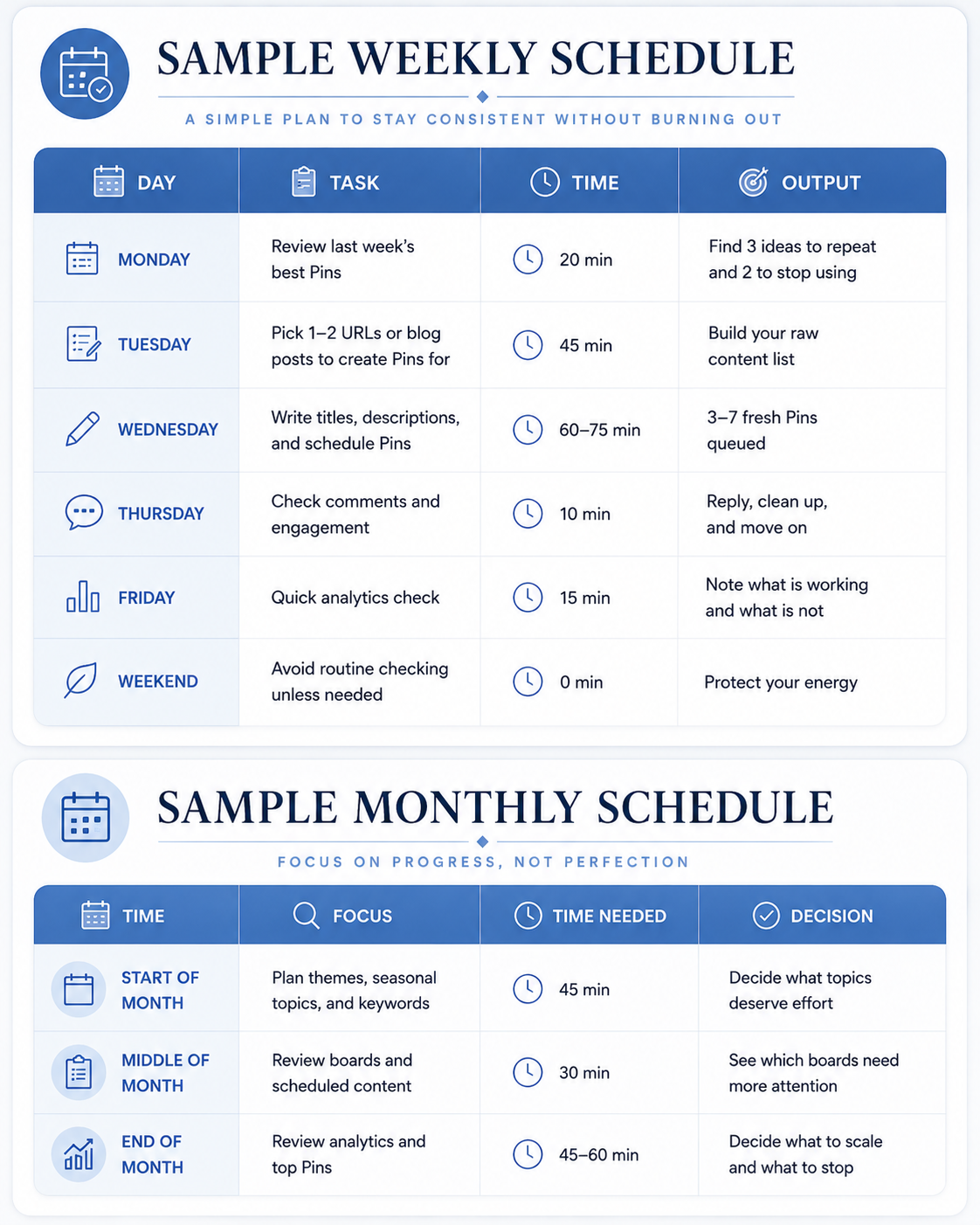
The schedule above is a safe starting point. It is not the maximum you can do.
Start with a simple system first. Then increase posting only if you can do it without lowering quality or burning yourself out.
There is also some mixed guidance from Pinterest about how far ahead Pins can be scheduled inside Pinterest itself. Some help materials mention 30 days, while another Pinterest article mentions two weeks. Because of that, it is smart to check the current scheduling limit inside Pinterest or your scheduling tool before building your whole workflow around one number.
The main message that this blog post is trying to say is to build a system that you can actually keep using. Consistency is what beats short bursts of overworking.
I really hope you found the post valuable! If you have any questions or have a certain topic that you want covered, you can reach out to me at: theoleinemann8@gmail.com. Now time for our sponsor! This post is sponsored by MerivoFlow’s Scheduler. MerivoFlow’s Scheduler is a lightweight pin scheduler that features the ability to post for an unlimited time frame and a content calendar view for $8/mo, making it really affordable compared to other companies in the space. Interested? Check out MerivoFlow tools for more information.
Get notified when a new post drops
Subscribe to get an email whenever we publish a new Pinterest growth guide. No spam, unsubscribe anytime.