The Basics of Pinterest SEO (Profile + Pins + Boards)
The Pinterest SEO checklist I use to get my pins discovered: profile keywords, pin titles/descriptions, tag strategy, and board SEO — everything that helps Pinterest know what you post so it can rank you.
The Basics of Pinterest SEO
Before we get into the weeds of Pinterest SEO I think an introduction is needed hi my name is Theo I am a student currently going into my third year of college with my major being in Business Administration and finance, during my time in college and a little bit before that I have gained experience in building up Pinterest accounts, my best performing is an account focused on health and fitness reaching 1+ million impressions a month, as of writing that account is hovering around 300k impressions a month due to my focus switching to MerivoFlow. My goal with MerivoFlow is not just to share what I have learned, but also to continue finding strategies for ranking and maintaining that rank on Pinterest.
Pinterest SEO is a broad term that involves optimizing the overall performance of your Pinterest profile, from boards to pins and, of course, the profile. Why should you care? That is a great question. Placing your brand in front of the right keywords can make the difference between getting the conversion and not. Furthermore, it's important for both to be found on Pinterest and Google. Something you might not know: Pinterest pages are also crawled by Google, meaning your page and pins are shown when a person searches for the keyword your profile is targeting.
The first thing we will cover is the Pinterest profile, which is an integral part. The Pinterest profile can be optimized in a few ways, one being adding keywords to the Username, as you may have even seen when searching in the Pinterest search bar. This helps clearly communicate to Pinterest and your audience the niche you are in. For best practices, you should use the vertical line, which looks like this │ , for the purpose of making it clean.
 (Example of how to use the vertical line & Keywords)
Moving on to the description, it should both inform the user and slip in some keywords. As shown in the image I provided, 2 to 3 keywords are a good baseline for communicating what your account is about without appearing spammy. My best advice is if you are struggling to find your keywords, use the Pinterest search bar fill in. Having a profile pic of a real person (yourself) isn't really necessary for optimization; a logo will do just fine, but it's great for building trust with your audience if you are comfortable showing your face.
 (Example of how to utilize the description)
Pins can be a whole other blog post on their own, but the overview is to fit the keyword into the image title and description, which clearly tells Pinterest it is a smoothie and should be put in the smoothies category. And take advantage of the 10 tags; even if they are not exact, you may even stumble across a receptive audience you did not intend. Five should be exact to what your pin is about, and the other three should be closely related, and the last two should be tests. And tags further confirm to Pinterest that the pin belongs in said category. And for basic pin design advice, keep the text minimal and to the point, use a clean background, and clearly address the audience's pain points. For example, a smoothie pin addressing a common pain point might say, "Make this smoothie in under 5 mins," or "This smoothie can help support weight loss." In this case, making it pain-point focused for people in a rush or on a weight-loss journey. 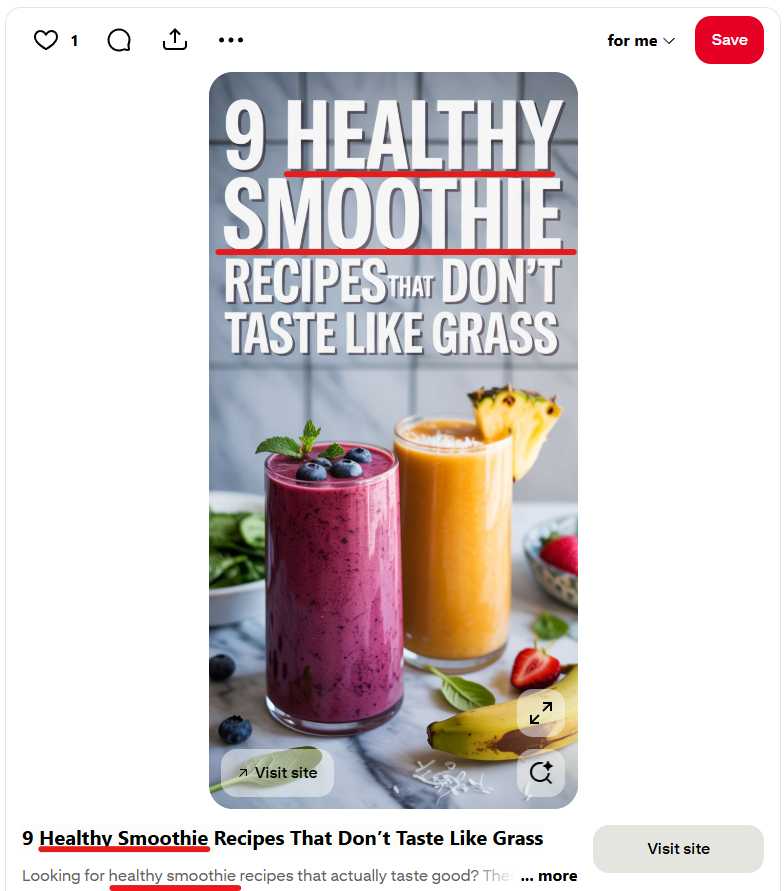
(Great Example of keyword placement within a pin)
Boards are straightforward; put whatever keyword you are targeting in the title and description. However, the key is to make it flow naturally. Furthermore, adding fresh content to the board, whether your own or repinned from others, is crucial. Additionally, adding people to a board could help (more saves + activity signals). Pro tip: Being selective, so the board theme is consistent, is a good idea. Most people make a board, save a pin, then leave it. If your goal is to make the most and rank it, you should update continuously. Having people follow the board and ranking will slowly come with time.
To make it easier, I have created a checklist of best practices for you to use. 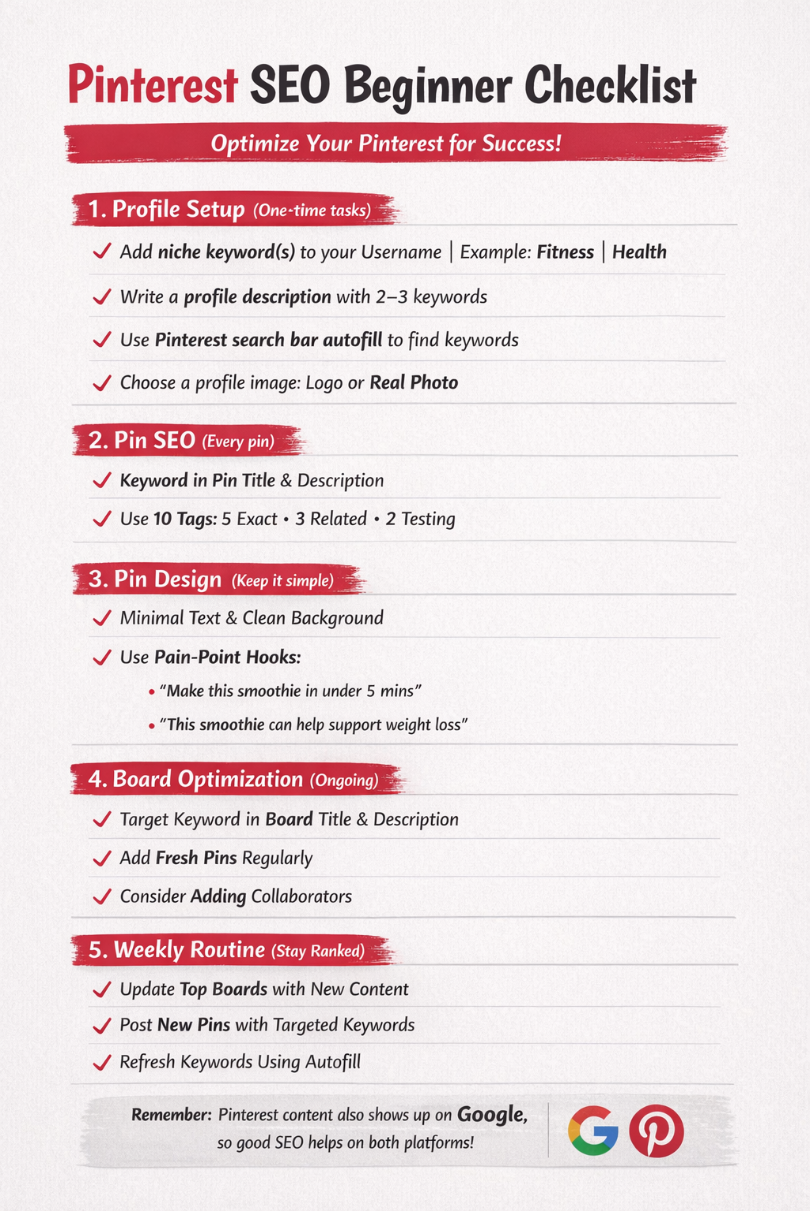
I hope you found the post valuable. If you have any questions or want a certain topic covered, you can reach me at: theoleinemann8@gmail.com. Also, this post is sponsored by me. I have made a lightweight pin scheduler with the ability to post with an unlimited time frame, and it also has a content calendar view for $8/mo, which makes it really affordable compared to other schedulers in the space. Interested? Check out MerivoFlow tools for more information.
Get notified when a new post drops
Subscribe to get an email whenever we publish a new Pinterest growth guide. No spam, unsubscribe anytime.